Your Mac.
Under control.
Snap windows into place, watch live CPU, GPU and memory, play music from the notch, keep a clipboard history and speed up Finder — one fast, native app tucked into your menu bar.
- One-time price
- £0.79
- Free trial
- 3 days
macOS 26 Tahoe or later · Apple silicon & Intel

Every window, exactly where you put it.
Drag towards an edge and iToolMac previews the zone before you let go — or trigger the same position from the keyboard. Halves, quarters, thirds and centre, instantly.
- Custom layouts
- Save any arrangement, recall it in one shortcut
- Multi-monitor
- Throw a window to the next display by keystroke
- Keyboard-first
- Every zone has a shortcut — no dragging required
Instrumentation, not a widget.
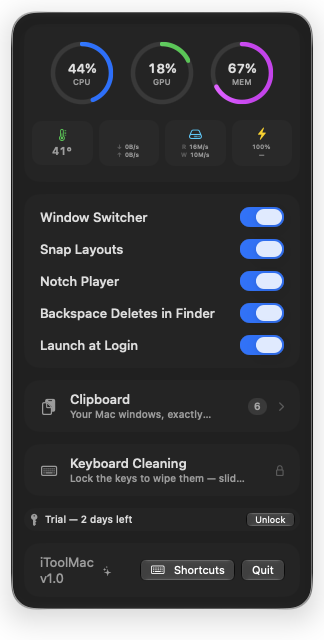
Six live gauges sit in your menu bar at all times, with a full dashboard and per-process breakdown one click away — real numbers, not an animated icon.
- CPU
- Per-core load, right in the menu bar
- GPU
- Usage while rendering or gaming
- Memory
- Pressure, not just raw usage
- Disk
- Read / write throughput
- Network
- Live up / down speed
- Power
- Draw, battery health & charge
The one part of your Mac
nobody else uses.
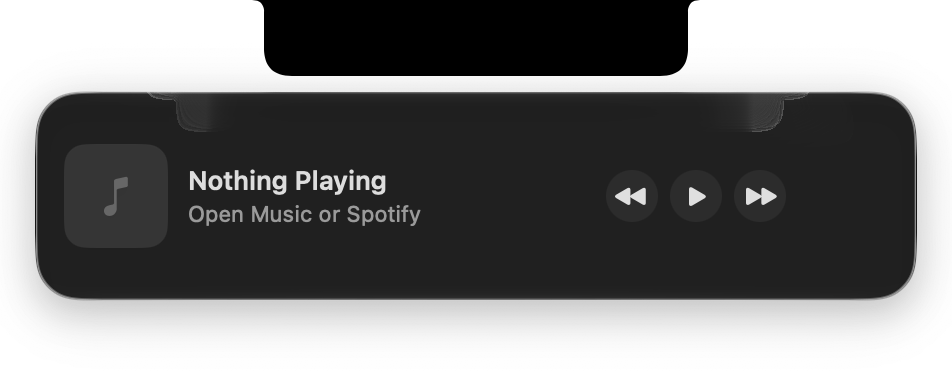
Hover the notch and a tidy player slides out — play, pause and skip Apple Music or Spotify, each remembering its own volume.
Hold ⌘V. Everything you've copied is right there.
iToolMac keeps your last 40 copies. Hold ⌘V anywhere and your history appears at the cursor — nothing pastes until you pick. Pin the entries you reuse; a quick tap still pastes as usual.
The keys are off.
Lock the keyboard before you wipe it down. Nothing gets typed, no shortcuts fire — slide to turn the keys back on when you're done.
Small changes, felt every day.
- ⌫
Backspace deletes in Finder
Select a file and press Backspace to move it to the Trash — never while renaming or searching.
- ⌘⇥
A smarter Window Switcher
Every real window — minimised, full-screen, other Spaces — ordered by most recently used.
- ⌃⌥G
Adjustable gaps & margins
Tune the spacing between tiled windows and the screen edge to taste.
- ⚡︎
Battery notices in the notch
Plugging in, unplugging, and 20% / 10% warnings appear as a small pop-out under the notch.
iToolMac 1.0
What's new- 01Snap layouts — Drag to an edge for a live preview, or drop on a layout bar zone.
- 02Snap from the keyboard — ⌃⌥ + arrows snaps halves, maximises or centres — no mouse.
- 03Clipboard history — Your last 40 copies, browsed from the wand menu.
- 04⌘V palette — Hold ⌘V for history at the cursor. ⌥ pastes plain text.
- 05Finder backspace — ⌫ moves selected files to the Trash — never while renaming.
- 06Per-player volume — Music and Spotify each remember their own level.
- 07Battery notices — Charge and low-power warnings pop out from the notch.
- 08Smarter ⌘⇥ — Every real window, most-recently-used first, phantoms filtered out.
Beyond the built-in controls
macOS handles the basics. iToolMac adds the precise, keyboard-driven control the built-in options leave out.
| Capability | Native window controls | iToolMac |
|---|---|---|
| Custom snap zones | ||
| Keyboard shortcuts for every action | Limited | |
| Saved multi-window layouts | ||
| Move windows across displays by shortcut | Limited | |
| Adjustable gaps, margins & animation | ||
| Instant centring at an exact size |
Based on standard macOS window controls. Capabilities may vary by macOS version.
Take control of every window.
Give iToolMac a try and feel the difference a tidy workspace makes.
macOS 26 Tahoe or later · Apple silicon & Intel
Try free for 3 days, then redeem a licence key. No account required. · £0.79 one-time purchase — one licence key, yours to keep.